
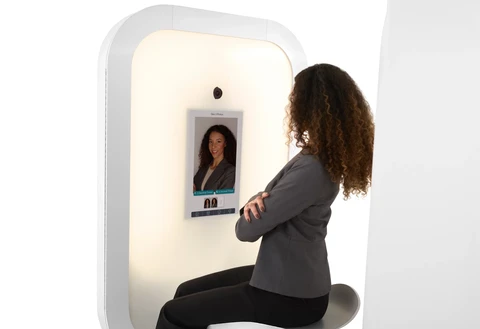
Professional Headshot Iris Photo Booth
Professional photos are a must-have for any LinkedIn account, but they can also be used for websites, portfolios, conference presentations, and more! The problem is finding the time and resources to get a professional photo taken. That’s why the CSU Center for Career Coaching is proud to present our free, self-service photo booth.
- Drop by the Center for Career Coaching, 2nd FloorSchuster
- Monday through Friday from 8:30 AM until 4:30 PM
- No appointment necessary, free of charge for all of CSU
It’s easy to operate – when you enter the booth, just scan the QR code, enter your CSU email, follow the instructions, and you’ll be able to control the photo booth right on your phone. The photo booth offers you a tutorial with instructions on how to operate it as well. You can take up to three photos in one session, plus one retake, and choose one to edit & send to your email.
You are welcome to take as many pictures as you like, but please be mindful of those who are waiting behind you. If there is a line for the photo booth, you’re allowed 8 minutes to take your headshot before one of our staff members may come and kindly ask you to let someone else have their turn. While taking photos, you can choose either a 3-second or 6-second timer (the 6-second timer is highly recommended). In between photos, the photo booth also offers tips on how to take the best professional headshot possible.
You’ll want to wear business professional or business casual attire, at least from the waist up, for your photo. Consider the purpose of your photo and the type of opportunity you’re most likely to seek.
If you need attire, you can find your fit at the Center for Career Coaching Career Closet.
Here are some helpful tips as you plan your outfit:
- Solid colors and darker neutral shades look best
- Avoid wearing distracting patterns; If wearing a patterned shirt or tie, pair it with a solid jacket or sweater
- Accessorize thoughtfully; try not to draw attention away from the face
- Consider the type of dress required for the industry you’re most likely to work

It’s easy to operate – when you enter the booth, just scan the QR code, enter your CSU email, follow the instructions, and you’ll be able to control the photo booth right on your phone. The photo booth offers you a tutorial with instructions on how to operate it as well. You can take up to three photos in one session, plus one retake, and choose one to edit & send to your email.
You are welcome to take as many pictures as you like, but please be mindful of those who are waiting behind you. If there is a line for the photo booth, you’re allowed 8 minutes to take your headshot before one of our staff members may come and kindly ask you to let someone else have their turn. While taking photos, you can choose either a 3-second or 6-second timer (the 6-second timer is highly recommended). In between photos, the photo booth also offers tips on how to take the best professional headshot possible.
The Center for Career Coaching is committed to providing access for all people. If you need accommodation with the photo booth, please contact us at careercenter@columbusstate.edu or (706) 565-1191 to arrange reasonable accommodations.
Professional Photo Booth is intended for professional photos only. Photos must not contain inappropriate gestures, props, or nudity. The Career Center may review photos periodically for compliance. Violations may result in a blocked Handshake account and referral to CSU Student Conduct.